A-be-ce-darian

Monday, October 09, 2006

Find the IP Address of a Particular Site

If you want to know the IP address of a particular site for any reason, then just follow these steps:

1.From the Start Menu click "Run".
2.Then type "cmd".
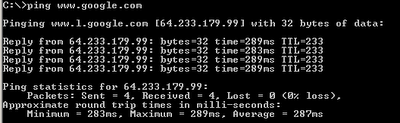
3.Now type the below command at the prompt

ping [sitename]

Ex: ping www.google.com


Soon you'll get the Ip Address of that site.You can use that IP address to locate where exactly the server is.There are many sites which help us to know where exactly the server is.

Labels: , , ,

Find What You Want on Google Search Precisely

Many of us use Google Search almost for finding any topic.But, we do little to find how to make our search more relevant.Google offers a collection of search facilities to make our search more relevant and accurate.

Phrase Searches
Google normally ignores common words such as 'and','how','what' etc., because, those words slow down the search process.So ,if we search for an exact phrase such as "cats and dogs" , we get results containing pages with cats and dogs terms separately but not the exact phrase.In order to get the exact phrase just mention the phrase in double quotes.
Ex:"cats and dogs".

Negative terms
If your search term has more than one meaning (for example: apple.Apple may mean a fruit or a computer or an iPod)you can focus your search by putting a minus sign ("-") in front of words related to the meaning you want to avoid.
Ex:apple -fruit.

"OR" search
To find pages that include either of two search terms, add an uppercase OR between the terms.
Ex:apple OR orange

Domain search
You can use Google to search only within one specific website by entering the search terms you're looking for, followed by the word "site" and a colon followed by the domain name.
Ex: rss site:http://meakkineni.blogspot.com

Numrange search
Search for results containing in a given range by adding two dots(..).
Ex:notebook $1000..$5000

Star search
If you remember only a part of your search term or if you are unclear about your search term or if you want to find a term which starts with or which ends with or is embedded between two unknown terms ,then you can use this star search.Just include a '*' wherever you are unclear
Ex:To find all blogs in blogspot use the search term *.blogspot

File type search
If you prefer to see a particular set of results with a specific file type (for example, PDF links), simply type filetype:[extension] along with your search terms. Google currently supports 12 file formats.
Ex: blog filetype:pdf (This query retrieves all pdf files containing blog term).

Source:Google Help

Labels: , , ,

Sunday, October 01, 2006

Tips on Safe Usage of Notebook Computers

Almost every person is now planning to buy a laptop ,but almost every other person is giving a suspicious look on the battery of the laptop.Reason - The laptops are exploding due to battery overheat.

After some reported incidents of explosion,many companies are recalling their Notebooks.The U.S. Consumer Product Safety Commission (CPSC) is aware of at least 47 incidents involving smoke or fire associated with notebook computers, from January 2001 through August 2006. To promote safe use of notebook computers, batteries and chargers, CPSC offers the following tips:
  • Do not use incompatible computer batteries and chargers. If unsure about whether a replacement battery or charger is compatible, contact the product manufacturer.
  • Computer batteries can get hot during normal use. Do not use your computer on your lap.
  • Do not use your computer on soft surfaces, such as a sofa, bed or carpet, because it can restrict airflow and cause overheating.
  • Do not permit a loose battery to come in contact with metal objects, such as coins, keys or jewelry.
  • Do not crush, puncture or put a high degree of pressure on the battery as this can cause an internal short-circuit, resulting in overheating.
  • Avoid dropping or bumping the computer. Dropping it, especially on a hard surface, can potentially cause damage to the computer and battery. If you suspect damage contact the manufacturer.
  • Do not place the computer in areas that may get very hot.
  • Do not get your computer or battery wet. Even though they will dry and appear to operate normally, the circuitry could slowly corrode and pose a safety hazard.
  • Follow battery usage, storage and charging guidelines found in the user’s guide.
  • If you are suspicious about your laptop battery,check the website of your laptop manufacturer.Many manufacturers have put (on their websites) the serial numbers of batteries which may cause damage.If you are still conspicuous contact them through phone.
Picture courtesy:The Globe and Mail

Labels: ,