A-be-ce-darian

Sunday, February 11, 2007

Each Googler Makes $431,861.80 for Google

TechBeef dug into the financial statements of some top companies and found quite interesting results(may not be precise) in different segments. But the chart shown below caught my attention.

As you can see in the chart that each Google employee makes $431,891.80 for Google. That's really an incredible amount. That's the reason why Google pays so much attention towards its employees.

Though Microsoft is way ahead of Google in terms of profit, it's no where near to Google as far as profit per each employee is considered.

Picture Courtesy : Techbeef

Labels: ,

Monday, December 18, 2006

Google Adsense Discourages Placing Images Next to Ads

One of the many tricks for higher Adsense click through rate is laying images side-by-side Ads. Laying an image next to an Ad makes people believe that the Ad is associated with the image and eventually they click on it.

But Google Adsense policy on placement of ads and images strictly discourages the above mentioned practice. Their policy states
"We ask that publishers not line up images and ads in a way that suggests a relationship between the images and the ads. If your visitors believe that the images and the ads are directly associated, or that the advertiser is offering the exact item found in the neighboring image, they may click the ad expecting to find something that isn't actually being offered. That's not a good experience for users or advertisers.

Publishers should also be careful to avoid similar implementations that people could find misleading. For instance, if your site contains a directory of Flash games, you should not format the ads to mimic the game descriptions."
Examples that wouldn't comply with Adsense policies.

This policy doesn't mean that one shouldn't place images on a page containing Google Ads, it only asks us to be sure that the ads and images are not arranged in a way that could easily mislead or confuse visitors.

Labels: , , , , ,

Wednesday, December 13, 2006

IBM and Yahoo Team Up to Launch Free Enterprise Search Product

IBM with Yahoo launched a new, free enterprise search product. This product is particularly aimed at mid-sized businesses (or even large enterprises!). This new product named as IBM OmniFind Yahoo! Edition is perhaps the first product from Yahoo(and IBM) which is considered as a serious threat to Google.

IBM OmniFind Yahoo Edition has been designed to be simple to install and use, and can index up to 500,000 documents from more than 200 file types, like Adobe Systems’ PDF and Microsoft’s Word and Excel. This search application is available for Linux or Windows servers. Also this application can be customized and tuned to enterprise needs and supports more than 30 languages.

The look and feel of search results will be much similar Yahoo's search results but without any ads. But the search results contain links to Yahoo thus bolstering the company's search traffic.

On the other hand Google might be closely watching this new application. Google already has an enterprise application called as "Google Mini" but comes with a cost of $1,995 (including hardware) that indexes upto 50,000 documents and a more sophisticated tool at $8,995, which can index upto 300,000 documents.

Labels: , , , ,

Saturday, December 09, 2006

Google Launches Click to Call Service in India

Google has announced its "Click to Call" service in India. This service is a great boon to both advertisers and customers in India. With this service companies can reach large number of customers as people in India started to embrace Internet more and more.

With this service customers can directly call advertisers that too with free of cost. Here is how it works
  • The customer has to click a green telephone button next to an ad.

  • Upon clicking the button, the ad would expand and show a window where the customer has to submit his telephone number. Then he/she has to press the button “Connect For Free.” Eventually, the user would get a direct call from the advertiser.
This is a more secure method as Google will not share our phone number with the advertisers. This service is very effective as people don't have to pay anything from their pockets while reaching their advertisers.

Labels: , , , ,

Wednesday, November 01, 2006

Google Talk Now Allows us to Leave Offline Messages

The much awaited feature from Google Talk is now out. We can now send offline messages to anyone in our contact list!!

Till now, when we send a message to someone not signed in, an error is displayed stating: "<email address> is offline and can't receive messages right now." But now we can send messages to our friends though they are not signed in.The message from Google talk appears like this "<your friend> is offline. You can still send this person messages and they will receive them the next time they are online."

The great thing about this new feature is, the offline messages sent to us can also be viewed in our gmail account. However offline messages won’t work if the recipient hasn’t enabled chat history. What's happening here exactly is, the offline messages written by us are sent directly to the recipient's gmail account and will be stored in the chat history. However if we disable chat history there is no way the messages get stored. So, ensure that your chat history is enabled.

This is how it appears if the offline messages are viewed in our Gmail account

Now Yahoo will be a bit worried.

Labels: , ,

Tuesday, October 24, 2006

Create Your Highly Specialized Custom Search Engine With Google Co-op

Thanks to Google. Now we too can create our own search engine which reflects our interests. With Google's Custom Search Engine under Google Co-op, we no longer require to search the entire web. We can create our own search index (list of sites to be searched). Also we can change the look and feel of our search engine.

Google's Custom Search is "free," but comes with AdSense(ads) alongside search results. That requirement is exempted for governments, non-profits and educational institutions. Perhaps the most basic and obvious aspect of this is that it potentially creates more AdSense inventory for Google.

Two important twists
  • The original creator of a search engine can allow anyone or selected colleagues, friends or community members to contribute to his index (sites to be searche). For example if I create a new search engine on "Conference Call Services" and I want my friends to contribute new sites to my index I can ask them to do so by sending them invitations.
  • We can also make money with our Custom Search Engine by connecting it with a Google AdSense account. We make money when users click on an ad they see in our search results. If we have more than one Custom Search Engine, all of our search engines will automatically be associated with the same AdSense account.

Labels: , , ,

Saturday, October 21, 2006

Will Google Loose Out to Guruji.com in Indian Local Search Market ?

Guruji,a new search engine in India will soon become a threat to Google in Local Search Market.Guruji is quite fast and the search results are quite convincing.The results are more relevant compared to Google.

Guruji.com has simple interface.User can search entire India or can limit his search to his city by including the city name as a keyword in the search(select city tab for better results).Thought Garage has a very interesting post about Guruji's local search results.

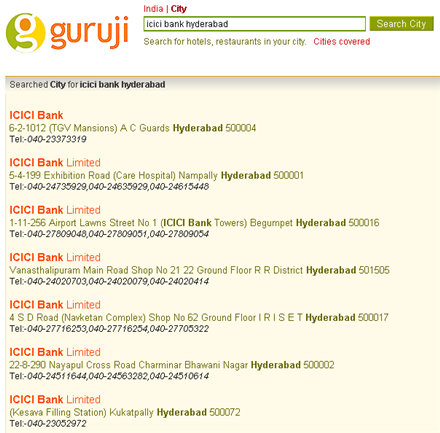
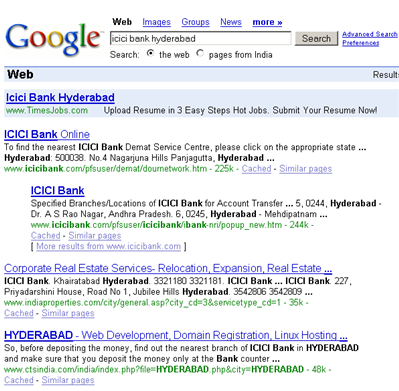
Below are the screens of both Guruji and Google when I searched for "icici bank" branches in Hyderabad(a city in India).

Guruji


Google

Clearly the results of Guruji are far better when compared to Google.Guruji provides me with the address as well as telephone numbers just like Yellow Pages.

Labels: , ,

Tuesday, October 17, 2006

Everything About Google - Google CheatSheets

Google Cheat Sheet lists all Google services and tools as well as background information. The Cheat Sheet offers a great reference to grasp of basic to advance Google query building concepts and ideas. Especially useful for novice users. Contains two pages(pdf).

The author of this page claims that these were written for educational purposes and has no affiliation to Google. To contact him you can use his E-mail Id:eazyrhymez@gmail.com.

The two pages of Google Cheat Sheets cover:
  • A list of all Google domains
  • Company information
  • Google Form Elements
  • Google Services
  • List of fun Google services and tools
  • List of 15 official Google Blogs
    and more! Click here to downlaod.
Note:This information was last updated on April 23, 2006 (Version 1.05)

Google Cheat Sheets[via Adelaider]

Labels: ,

Saturday, October 14, 2006

Check Out What's Hot From Google,Microsoft,Yahoo,IBM and Adobe

Looking for "to be launched" products from Google,Microsoft,Yahoo,IBM and Adobe ? Then you should visit their labs section where they showcase some of their cutting edge products, which are yet to be released.

Google Labs
Google labs showcases a few of their favorite ideas that aren't quite ready for prime time.You can test those products and use them if you like them.You can help Google by reporting bugs if you find any.

Microsoft Live Labs

This is where Microsoft showcases its yet to be released products.For latest products check out their projects section.

Yahoo Next

Yahoo Next is a showcase of some of Yahoo!'s newest and coolest projects - the cutting edge of what Yahoo!'s doing today and working on for tomorrow!

Adobe Labs
Adobe Labs provides you with the opportunity to experience and evaluate new and emerging innovations, technologies, and products from Adobe.

IBM alphaWorks Services
This is where IBM unveils some of the many innovative Research & Development projects from its development labs around the world.

Labels: , , , , , ,

Monday, October 09, 2006

Find What You Want on Google Search Precisely

Many of us use Google Search almost for finding any topic.But, we do little to find how to make our search more relevant.Google offers a collection of search facilities to make our search more relevant and accurate.

Phrase Searches
Google normally ignores common words such as 'and','how','what' etc., because, those words slow down the search process.So ,if we search for an exact phrase such as "cats and dogs" , we get results containing pages with cats and dogs terms separately but not the exact phrase.In order to get the exact phrase just mention the phrase in double quotes.
Ex:"cats and dogs".

Negative terms
If your search term has more than one meaning (for example: apple.Apple may mean a fruit or a computer or an iPod)you can focus your search by putting a minus sign ("-") in front of words related to the meaning you want to avoid.
Ex:apple -fruit.

"OR" search
To find pages that include either of two search terms, add an uppercase OR between the terms.
Ex:apple OR orange

Domain search
You can use Google to search only within one specific website by entering the search terms you're looking for, followed by the word "site" and a colon followed by the domain name.
Ex: rss site:http://meakkineni.blogspot.com

Numrange search
Search for results containing in a given range by adding two dots(..).
Ex:notebook $1000..$5000

Star search
If you remember only a part of your search term or if you are unclear about your search term or if you want to find a term which starts with or which ends with or is embedded between two unknown terms ,then you can use this star search.Just include a '*' wherever you are unclear
Ex:To find all blogs in blogspot use the search term *.blogspot

File type search
If you prefer to see a particular set of results with a specific file type (for example, PDF links), simply type filetype:[extension] along with your search terms. Google currently supports 12 file formats.
Ex: blog filetype:pdf (This query retrieves all pdf files containing blog term).

Source:Google Help

Labels: , , ,