A-be-ce-darian

Monday, November 06, 2006

Find Out Your Internet Connection Speed With Speedtest

If you feel that you are being cheated by your Internet Service Provider, then use Speedtest to find out the exact speed of your connection.

Speedtest is an online tool to check the speed of your connection. Though there are many other online tools available such as Speakeasy, this tool has a cool interface and is pretty fast when compared to others. Also you can test your connection speed against different geographically located servers.

You can also share your results with others via the link provided by Speedtest.

Speedtest [via Lifehacker]

Labels: , ,

Saturday, October 28, 2006

Handbook For Bloggers

According to Technorati(a blog-tracking site) 175,000 blogs are being created everyday. In other terms, a new blog is born every half second. So, blogosphere has an infant every half second. But only few of them know what exactly blogging is, what are the ethics to be followed, what are the terms used in blogging community and so on and so forth.

If you are a toddler in blogging community then you may find this book handful.This book from Reporters Without Borders provides information one must know about blogging.

Some key topics:
  • Language of blogging
  • What ethics should a blogger have?
  • Getting your blog picked by Search Engines
  • How to blog anonymously?
Click here to download the pdf version.

Labels: , , ,

Friday, October 20, 2006

Use Random Email Generators - Keep Your Original Email Safe From Spammers

We are often asked to enter our email address on various sites for various reasons. I don't know about you, but I feel pretty discomfortable providing my email address to many of those sites. Reasons -
  • I'm not aware whether they are spammers
  • I don't want to clutter my personal email with messages from those sites.
  • What if the site continually bugs me(such as asking to visit their site)?
But still I want to browse that site to know what's inside.

In order to avoid such a scenario we've got sites which provide us with temporary E-mail IDs. We can provide these IDs whenever we're suspicious about a site/person.

MyTrashMail
  • Free service. Premium services also available.
  • Email size is limited to 2MB per email.
  • Every account can hold up to 4MB.
  • Email stays to 5 days in your account.
  • Supports attachments.
DodgeIt
  • Free service. Premium services also available.
  • Email stays upto 7 days in your account. Then it's deleted.
Mailinator
  • Free service.
  • Attachments aren't allowed and any given mailbox will only hold 10 messages at once.
  • After a few hours, all emails are auto-deleted.
How they work?
Imagine you are at a coffee shop. A salesperson comes and asks for your email id to send you lastest information about their products.Now you can't give him your real email address.So,what you can do is give him an email id created instantly in your mind such as forsales@mailinator.com. Later you can always type in the address to check mails from him(if at all you're interested). So simple!!!

But be careful.Don't ask anyone to send your/their personal information to this ID as others can alos see your mails.

Labels: ,

Tuesday, October 17, 2006

Everything About Google - Google CheatSheets

Google Cheat Sheet lists all Google services and tools as well as background information. The Cheat Sheet offers a great reference to grasp of basic to advance Google query building concepts and ideas. Especially useful for novice users. Contains two pages(pdf).

The author of this page claims that these were written for educational purposes and has no affiliation to Google. To contact him you can use his E-mail Id:eazyrhymez@gmail.com.

The two pages of Google Cheat Sheets cover:
  • A list of all Google domains
  • Company information
  • Google Form Elements
  • Google Services
  • List of fun Google services and tools
  • List of 15 official Google Blogs
    and more! Click here to downlaod.
Note:This information was last updated on April 23, 2006 (Version 1.05)

Google Cheat Sheets[via Adelaider]

Labels: ,

Edit Your Image Online

Pictures play a vital role in our daily lives.So as editing pictures.Since I don't have any desktop based picture editing software at one of my aunt's house I had to depend on "Online Image Editing Softwares" for editing her images.I found some good sites where we can manipulate our pictures pretty comfortably.

Cellsea
This is my favourite online application.The best part is, there is no registration process.The interface is pretty cool.I feel as if I'm using a desktop application while working on it.It provides many features such as resizing ,croping,rotating,coloring an image and many more.We can save the edited image to our PC or mail it to a friend or upload it to Flickr.

Picture2Life
This is my second favourite application.I ranked it second because to use this application we need to register with it.The rational for asking to register is we can save the edited pictures on their server(site).It differs from other applications by providing an animation feature.

Phixr
Phixr is another application with rich features.This too requires registration(someone corrected me) doesn't require registration. It provides almost all features as other online applications.What makes it unique are its facilities such as clubbing two pictures together,saving the image in different formats etc.

There are many other tools available such as Spinshot,ImageAuthor but I personally like the above mentioned tools.

Labels: , , ,

Sunday, October 15, 2006

Information About Cookies

Cookies are undoubtedly the inherent part of Internet.They help both users and websites save valuable time and provide a better way of communication.Let's digg about cookies in detail.

What are Cookies ?
Cookie is a small piece of information sent by a Web server[like www.gmail.com] to a Web browser[like internet Explorer]. The browser stores the message in a text file. The message is then sent back to the server each time the browser requests a page from the server.

Cookies can be best explained by a typical daily used E-mail.Open your favourite email site such as Yahoo or Gmail .Now type in your id and password and check the box "Remember my ID in this computer" and click sign in.Once you are signed in close the browser without logging out.Now if you open the earlier site again ,you will not be prompted for your id and password ,instead you will directed to your inbox.This is because when you checked the box "Remember my ID in this computer" the website had put some piece of information as a simple text file in your harddisk ,which is nothing but a cookie.

This cookie can only be read by the server which actually placed it.Once you log out, the cookie is automatically deleted.These type of cookies are called "Temporary cookies".There are also "Permanent Cookies" which won't get deleted even after logging out or closing the browser.

What are they used for ?
  • Personalized Start Pages
  • Online Ordering Systems
  • Website tracking
  • Targeted marketing
What about Security ?
An HTTP Cookie cannot be used to get data from your hard drive, get your email address or steal sensitive information about your person. Early implementations of Java and JavaScript could allow people to do this but for the most part these security leaks have been plugged.

For more information click here

Labels: ,

Saturday, October 14, 2006

Check Out What's Hot From Google,Microsoft,Yahoo,IBM and Adobe

Looking for "to be launched" products from Google,Microsoft,Yahoo,IBM and Adobe ? Then you should visit their labs section where they showcase some of their cutting edge products, which are yet to be released.

Google Labs
Google labs showcases a few of their favorite ideas that aren't quite ready for prime time.You can test those products and use them if you like them.You can help Google by reporting bugs if you find any.

Microsoft Live Labs

This is where Microsoft showcases its yet to be released products.For latest products check out their projects section.

Yahoo Next

Yahoo Next is a showcase of some of Yahoo!'s newest and coolest projects - the cutting edge of what Yahoo!'s doing today and working on for tomorrow!

Adobe Labs
Adobe Labs provides you with the opportunity to experience and evaluate new and emerging innovations, technologies, and products from Adobe.

IBM alphaWorks Services
This is where IBM unveils some of the many innovative Research & Development projects from its development labs around the world.

Labels: , , , , , ,

Five Websites an Infant to Internet Should Know

If you are a toddler in Internet and looking for some pretty good sites to start with, then this post would help you.Today I'm going to talk about 5 websites which are mostly talked about and which make our lives easy.One way we can say these 5 websites are icons of Web 2.0.

del.icio.us

del.icio.us is a social bookmarking website - the primary use of del.icio.us is to store your bookmarks online, which allows you to access the same bookmarks from any computer and add bookmarks from anywhere, too.So,you can get to your bookmarks from anywhere, no matter whether you're at home, at work, in a library, or on a friend's computer.

With del.icio.us you can keep links to your favorite articles, blogs, music etc.Also you can share favorites with friends, family, coworkers, and the del.icio.us community.

Digg

Digg is a user driven social content website.Everything on digg is submitted by the digg user community (that would be you). After you submit content, other digg users read your submission and digg what they like best. If your story rocks and receives enough diggs, it is promoted to the front page for the millions of digg visitors to see.

YouTube

YouTube is a free online video streaming service that allows users to view and share videos that have been uploaded by its members.

Watching videos on YouTube couldn't be easier—just go to the site and browse around, or search for subjects that interest you. To save your favorites for later, you need to sign up as a member, and then click the 'Add to Favorites' link underneath the videos you want to watch later. You can also create playlists to group favorite videos together into your own personal categories.

Flickr

Flickr is the best way to store, sort, search and share your photos online. There is a huge mass of photos in the world, and Flickr provides a way to organize yours, and for you and your friends and family to tell your stories about them.

The best way to learn about it is to upload some photos, explore the site, join some groups and make some friends.You can add tags,descriptions etc for your photos.

Technorati

Technorati indexes the live web within minutes, providing its users with up-to-date information about the topics and authors they care about. Technorati is the authority on what is happening right now on the live web including the blogosphere.

Technorati lets you track online conversations about you, your sites, your company, and your products. Technorati connects you to the most influential weblog authors, drives targeted traffic to your sites, and allows you to connect to the millions of other individuals in the blogger community.

Did I mention that all these sites provide their services for free?

Source:Delicious,Digg,Flickr,YouTube,Technorati

Labels: , , , , ,

Monday, October 09, 2006

Find the IP Address of a Particular Site

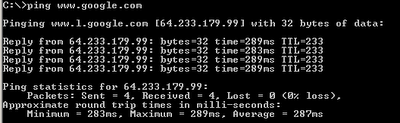
If you want to know the IP address of a particular site for any reason, then just follow these steps:

1.From the Start Menu click "Run".
2.Then type "cmd".
3.Now type the below command at the prompt

ping [sitename]

Ex: ping www.google.com


Soon you'll get the Ip Address of that site.You can use that IP address to locate where exactly the server is.There are many sites which help us to know where exactly the server is.

Labels: , , ,

Saturday, October 07, 2006

Tagging - A New Way to Categorize Items

After the unprecedented surge of Web 2.0, "Tagging" has become an integral part of Internet.Tagging has particularly made the life of bloggers easy.Not only bloggers ,but also blog readers take advantage of Tagging.

Tagging is a new way to categorize items (such as blog posts,bookmarks etc.) with the help of little keywords called as "Tags" or "Labels".Tags are one-word descriptors to help you organize and remember items.Tags are completely chosen by us.For Example - If you like/write an item on movie,then the possible tags are "Movie","Film","Actor","Actress" so on and so forth.Now, if you click on any tag all the articles related to that tag appear in front of you as a bunch.

You can assign as many tags as you like to an item.Multiple tags are generally seperated by commas.If you want to reclassify any item ,you just edit/delete the tags or add some more tags.So simple.

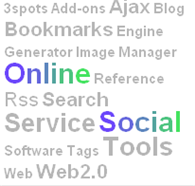
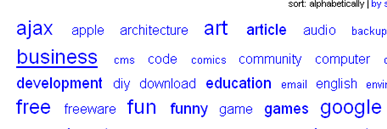
Sometimes we find a large collection of tags as shown belowThis large collection of tags is called "Tag Cloud".Inside the "tag cloud," tags are displayed larger and bolder when they are used more often. Thus, you can quickly see what tags other people are using, what items they are categorizing, and which tags are most popular. Clicking on separate tag links will show you other items that share a given tag.

Advantages
  • Tagging can be a lot easier and more flexible option than fitting your information into preconceived categories or folders.
  • A human reader can probably tell the purpose of the page by quickly scanning the list of tags.
  • You can drive traffic to your sites by using Social Bookmarking sites such as Delicious ,Technorati etc which support tagging.
  • If the server supports tag searching, a reader would be able to find all pages that use a particular set of tags.
  • If the page's author wishes to reclassify the page, all that is required is for them to change the list of tags.There is no need to relocate the page within a complex hierarchy of categories.
While using tags in such an organizational system is flexible and easy, tagging is not without its drawbacks. Typically there is no information about the meaning or semantics of a tag. For example, the tag "apple" might refer to the fruit, Apple Computer.

Note:For tags in this blog click on "Labels" option.

Labels: , ,

Wednesday, October 04, 2006

Web 2.0 - A New Incarnation of World Wide Web

When I first heard the word "Web 2.0",I dismissed it as some new programming language(since it has got a version number).To my consternation,I found that word everywhere.Only then, my curiosity increased about the term and I searched for it in Google and found some interesting results.
The concept of "Web 2.0" began with a conference brainstorming session between O'Reilly(O'Reilly Media spreads the knowledge of innovators through its books, online services, magazine, and conferences) and MediaLive International (Medialive International, Inc. produces information technology tradeshows and conferences).According to Wikipedia Web 2.0 refers to a supposed second-generation of Internet-based services — such as social networking sites, wikis, communication tools, and folksonomies — that let people collaborate and share information online in previously unavailable ways.

In their first conference opening talk, O'Reilly and MediaLive summarized key principles they believed characterized Web 2.0 applications:
  • Web as a platform.
  • Harnessing Collective Intelligence (Example:Wikipedia)
  • Network effects created by an architecture of participation.(Example:Blogs)
  • End of the Software Release Cycle.Earlier companies used to release a software as a product,but now they're releasing it as a service which needs constant monitoring.For example Google must constantly update its indices to rank webpages.
  • Rich User Experiences (Using technologies like AJAX.Google Maps mainly uses AJAX) .
Many find it easiest to define Web 2.0 by associating it with companies or products that embody the above principles.
Examples:Digg,Delicious,Wikipedia,Writely,Google Maps etc.

You can read more about Web 2.0 here and here

Tags:

Labels: ,

Tuesday, October 03, 2006

Know About Human Interactive Proofs


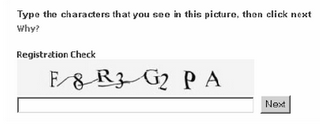
Whenever we sign up for a new account in Yahoo,Hotmail,Google and so on,at the end of the registration process we'll be asked to enter the characters present in a randomly generated image as shown in the picture.Why so???What exactly they want from us?

The answer to the above questions is.....
They want to prevent their sites from automated registrations.

Let's see what exactly are these automated registrations.Web services are increasingly becoming part of people’s everyday life. For example, we use free email accounts , we use online polls to gather people’s opinion. But all these Web services designed for human use are being abused by automated computer programs.

These automated computer programs register thousands of free email accounts every minute.These real-world issues have recently generated a brandnew research area called "Human Interactive Proofs (HIP)" which are mainly character based.

These HIPs mainly explore the gap between human and malicious attacks in terms of reading poorly printed or manipulated characters.Figure Above shows a character HIP used in MSN Passport,which consists of distorted characters and random arcs. A user needs to recognize the characters and correctly types in the space below the HIP to prove he/she is a human.

Now,what if a person doesn't know english??To overcome this a new technique called "Face HIP" is designed where a user will be asked to click on 4 points(Ex 2 eyes and 2 mouth corners)on a randomly generated distorted face embedded image.If the user can correctly identify these points, the face HIP concludes the user is a human;otherwise, the user is a machine..

Labels: , ,

Saturday, September 30, 2006

Podcasting - What is it And How it works?

If you browse the net quite for sometime ,then you would definitely come across the word "Podcasting".Some quick questions in mind.........
  • What is Podcasting?
  • Do we need an iPod to listen to podcasts?
  • Will I be charged for listening podcasts?
Well,let's see about Podcasts in detail.Podcasting is a method of distributing audio content over the Internet,so that it can be listened to at the user's convenience.The term was was a contraction of "iPod" and "broadcasting".

Even though the term was derived from iPod,one doesn't require an iPod to listen to podcasts.You can listen podcasts on any MP3 player for that matter even on our computer.And its absolutely free.

Typically there are three steps involved in setting up your personal computer to receive podcasts.
Step 1:Download Podcast Software
To make our computer receive podcasts we need to download a software.This software automatically checks for updated audio content in your favourite website and downloads it for you.This software is usually free.
Some of the softwares are:
iTunes
Juice
Doppler

Step 2:Setup and subscribe to podcasts
Once you have downloaded the software setup it (some simple steps).Now you have to subscribe to the feeds of your choice as you just do for RSS Feeds.

Step 3:Listen to the audio
Once a new episode from your favourite site becomes available,the podcasting software automatically downloads it for you.You can listen it on the spot or later.You can also download it to your iPod or any MP3 player.

Related Links: Also Know About RSS

Labels: , ,

Wednesday, September 27, 2006

A Simple Illustration of RSS for Abecedarians

RSS an abbreviation of "Really Simple Syndication" is a powerful way to distribute headlines to wide number of people.

If you are a beginner and willing to try "RSS" for the first time,then you may find this post helpful.Follow the below steps to get an overview of RSS

Step 1:Open the site you want to get updates or headlines.
For example Abecedarian

Step 2:Right click on the orange icon or the link which claims to provide the feed as shown in the figure and copy the link location using the "Copy Link Location" option.

Step 3:Now open Bloglines website which is one of the many "Feed aggregators".Sign Up with that site.It's free.

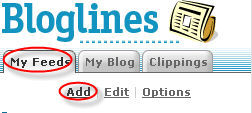
Step 4:Click on MyFeeds.Then click on Add option provided by Bloglines.


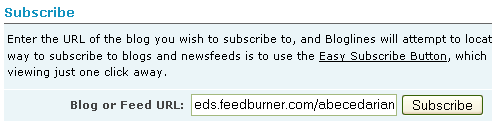
Step 5:Paste the link you got from your favourite website and click Subscribe button.

The rest will be taken care by Bloglines .It collects all the headlines with a brief introduction and displays it for you.If you like a particular article ,you can click on the headline link and navigate to your site.
You can unsubscribe from any feed at any time using the option provided by your respective feed aggregator.

Follow the above steps to add more feeds.

Related Links : Know About RSS

Labels: ,

Know About RSS - A Powerful Way to Distribute Headlines

Earlier if we want to keep updated ourselves with the articles of our choice or products of our interest ,we had to visit all the websites one by one - a very frustrating task.Or we had to subscribe to their Newsletters via E-mail - which is cumbersome.

So,how do we get information about our interests which is accurate,updated and which changes at irregular intervals?The solution is "RSS".RSS stands for "Really Simple Syndication".It is an easy way to distribute updated content/headlines to wide number of people.

How does RSS work?
RSS works like this
  • The website authors maintain a list of headlines on their website.
  • This list of headlines is called an "RSS Feed".
  • In order to read those feeds and organize them we have a special program(actually its an application) called "RSS aggregators".
How would I know whether a website offers its headlines as a feed?
Typically ,a website which offers RSS feed will have any one of the following
  • An orange button with the letters "XML" or "RSS"
  • A link such as "Syndicate this Site"
  • Buttons of different "RSS aggregators".
If you use firefox you can find an orange button in the address bar which indicates that site provides RSS feeds.

In case of button or link,we have to right click and copy the link with "copy link location" option.Once we have the link ,we have to submit it to RSS aggregator program.

Where can I get RSS aggregator program?
RSS aggregators are of two types
  • Desktop based(needs to be downloaded) such as FeedReader
  • Web based(we should register with it) such as Bloglines
In both the cases we have to submit the feed link ( which we got from the website of our choice ) in their respective add sections.Now ,the RSS aggregators do their job of collecting headlines from the website.

What if I don't want to receive feeds anymore?
You can unsubscribe from any feed at anytime in case you don't like it and don't want to receive headlines anymore from a particular site.

Advantages:
  • No need to visit each and every site.
  • Updated content.
  • Fast and reliable.
  • All related information at a single place.
Related Posts:A Simple Illustration of RSS , Also Know About Podcasting

Labels: ,